September 07, 2026 •
Rohit Negi •
insurance
Written by the Insure2Cover Content Team | Reviewed by Rohit Negi, Insurance Consultant, insure2cover.com | Last updated: August 2026
Quick Answer
You cannot always download the insurance policy PDF using only your vehicle number. However, you can enter your registration number on VAHAN or the mParivahan app to find your insurance company's name, policy number, and expiry date — and then download the duplicate policy from that insurer's official website or app after a quick OTP verification. Many insurers also push digital policies to DigiLocker, which is legally valid for traffic checks.
It usually happens at the worst moment. A traffic constable waves you down and asks for your insurance papers. Or you're standing at the RTO for an RC transfer. Or there's been an accident and the claim form wants a policy number you've never memorised. The document is somewhere — an old email, a glovebox, a WhatsApp forward from an agent whose number you deleted — but right now, all you have is your vehicle registration number.
So the real question is: can you download an insurance copy using only your vehicle number? The answer is partly yes. Your vehicle number can help you find important policy details, including the insurer and, in some cases, the policy number. If you specifically need to find your
insurance policy number by vehicle number, you can follow our detailed guide on that process. Once you identify the insurer, you can request the actual policy copy directly from the insurance company.
Can You Download an Insurance Copy Using Only the Vehicle Number?
Here's the distinction most articles blur: checking insurance details and downloading the policy PDF are two different things.
- Your vehicle number is enough to identify the insurer, policy number, and validity — government databases like VAHAN store this.
- But the actual policy PDF sits with your insurance company, and no insurer hands out policy documents to anyone who types in a registration number — that would be a privacy disaster. Downloading requires identity verification, usually an OTP on the registered mobile number.
So the working formula is: Vehicle number → find the insurer (VAHAN/mParivahan) → verify identity on the insurer's portal → download the PDF. Two steps, five minutes, zero office visits.
What Information Can You Get Using a Vehicle Number?
| Information |
Available with Vehicle Number? |
| Registration (RC) details |
Yes |
| Insurance company name |
Yes (where records are synced) |
| Policy number |
Often visible |
| Insurance validity / expiry date |
Yes |
| Policy PDF download |
Not directly — needs insurer verification |
Method 1 – Use VAHAN to Find Your Insurance Details
VAHAN (vahan.parivahan.gov.in) is the Ministry of Road Transport & Highways' national vehicle registry — the same database behind every vahan status and RC check in India. Insurers report policy data here, which is why it's your best starting point.
Steps:
- Visit the official VAHAN vehicle details service and enter your registration number to check the available vehicle and insurance information.
- Go to "Know Your Vehicle Details."
- Create a quick citizen login with your mobile number (one-time step).
- Enter your vehicle registration number and the captcha.
- The screen shows your RC details along with the insurance company name, policy number, and insurance expiry date.
Important: VAHAN can help you identify your insurer and check available insurance details, but it does not directly provide the policy PDF. Note down the insurer's name and policy number, then move to Method 4. If you do not have complete vehicle documentation and need to compare insurance options, you can also learn how to
get an insurance quote without a VIN number.
Limitations: Records depend on insurer-to-VAHAN data synchronisation. A very recently issued or renewed policy may take days to reflect, and some older records may show the previous insurer.
Method 2 – Use the mParivahan App
Prefer your phone? The mParivahan app (official MoRTH app on Play Store/App Store) does the same lookup on the go — most people already use it for mparivahan vehicle details and RC checks.
- Download mParivahan and sign up with your mobile number.
- Tap the RC search option.
- Enter your vehicle number.
- View registration details along with insurance validity and insurer name.
Bonus: if you add the vehicle as "My Vehicle" in mParivahan (verified against your details), the app maintains a Virtual RC that's legally accepted during traffic checks — handy companion to your digital insurance copy.
Method 3 – Check DigiLocker
DigiLocker is the government's digital document platform for accessing and storing authentic digital documents. You can check the
official DigiLocker website to see whether your insurance document is available through the platform.
- Install DigiLocker and sign in with your Aadhaar-linked mobile number.
- Go to "Search Documents" and search for your insurance company.
- Select the insurance policy document type, enter your policy number and details.
- The policy gets fetched into your Issued Documents — permanently available offline.
DigiLocker works best once you already know the insurer and policy number (which VAHAN just gave you). Documents in DigiLocker's "Issued" section are legally equivalent to originals under the IT Act — traffic police are required to accept them.
Method 4 – Download from Your Insurance Company's Website
This is where you actually get the PDF. Every major insurer offers a duplicate policy download, usually without even needing a full login:
- Visit the official website of the insurer VAHAN showed you.
- Look for "Download Policy," "Get Policy Copy," or "Self-Help / Quick Services."
- Enter your policy number or registered mobile number.
- Verify with the OTP sent to your registered mobile.
- Download or email yourself the duplicate policy PDF — free of cost.
A few examples of how this looks across popular insurers: New India Assurance offers policy download through its customer portal, National Insurance provides a policy download option on its website, ICICI Lombard allows instant policy copy via its app and website with just registered mobile verification, and Go Digit emails your policy within minutes from its self-serve section. The flow is nearly identical everywhere — policy/mobile number, OTP, download.
Insurer apps work even faster: install the app, log in with your registered mobile, and the active policy sits right on the dashboard.
Method 5 – Contact Your Insurance Company Directly
If portals fail (records mismatch, changed mobile number, portal maintenance):
- Customer care: Call the toll-free number, verify your identity, and request the policy on email/WhatsApp.
- Email support: Send your vehicle number, engine/chassis number, and registered owner details.
- WhatsApp support: Most large insurers now run WhatsApp bots that send policy copies after OTP verification.
- Branch visit: The last resort — carry your RC and ID proof.
What If You Don't Know Which Company Issued Your Insurance?
This is a common problem, especially with used vehicles. If you are also comparing insurance options after losing your previous policy details, you may want to know how to
get a car insurance quote without personal information before deciding on a new policy. Follow this flow:
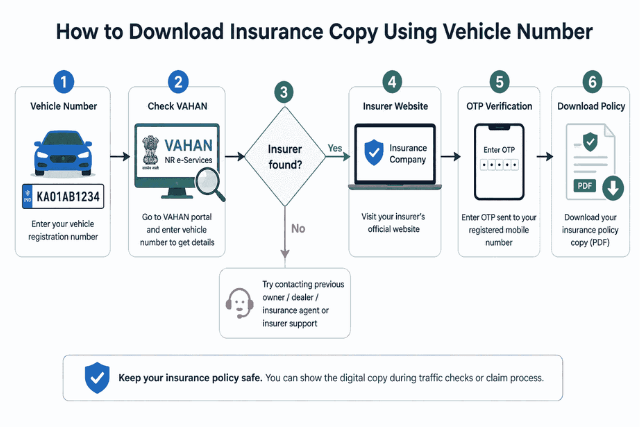 If VAHAN shows nothing:
- Try the IIB (Insurance Information Bureau) V-Seva portal — enter your vehicle number and accident date range to trace the insurer from the industry database.
- Ask the previous owner or dealer (for used vehicles) — the policy is likely in their name/mobile.
- Check old emails and SMS for the word "policy" plus your vehicle number — issuance messages usually survive.
- Contact any insurance agent who handled your paperwork.
Documents & Details You'll Need
| Requirement |
Purpose |
| Vehicle registration number |
Searching VAHAN/mParivahan |
| Registered mobile number |
OTP verification |
| Policy number (if available) |
Direct download |
| Engine/chassis number |
Identity verification on insurer portals |
| Registered owner's name & DOB |
Authentication |
Common Reasons You Can't Download the Policy
- Wrong registration number - A single digit off returns nothing; check your RC.
- Expired policy - Lapsed policies often disappear from quick-download tools; call the insurer.
- Mobile number mismatch - OTP goes to the number the insurer has on file, not your current one.
- Recently transferred vehicle - The policy may still be in the previous owner's name.
- Records not synchronised - New policies can take days to appear on VAHAN.
- Portal maintenance - Try the app, or simply try later.
Downloading Insurance Copy for a Used Vehicle
Bought a second-hand car or bike? Two things matter:
- The existing policy likely carries the previous owner's mobile number — you'll need their cooperation for the OTP, or route the request through the insurer's customer care with your RC transfer proof.
- Get the policy endorsed in your name within the transfer window. Until the insurer updates ownership, claims can get messy. Once endorsed with your mobile number, all future downloads are self-serve.
Is a Digital Insurance Copy Valid?
Yes. Digital policies stored in DigiLocker or mParivahan, or PDFs downloaded from the insurer's official portal, are legally recognised — MoRTH has directed traffic authorities to accept documents presented through these government platforms. Keep the latest policy saved offline on your phone, and you never need the printout again (though keeping one in the car never hurts).
Safety Tips
- Download only from official insurer websites/apps, VAHAN, mParivahan, or DigiLocker.
- Avoid third-party "insurance check by vehicle number" websites that ask for payments or personal details — many are data-harvesting traps.
- Never share OTPs with anyone claiming to "help" download your policy.
- After downloading, verify the vehicle number, IDV, and validity dates on the PDF. You should also review any additional coverage included in the policy, such as RTI in car insurance, if applicable to your vehicle.
Key Takeaways
- Your vehicle number can find your insurance details — VAHAN and mParivahan show insurer, policy number, and expiry.
- The actual policy PDF comes only from your insurer, after OTP verification.
- DigiLocker copies are legally valid for traffic checks.
- Used-vehicle owners should get the policy endorsed in their name early.
- Trace unknown insurers via VAHAN first, then IIB, then the previous owner or dealer.
Conclusion
Losing an insurance document in 2026 is an inconvenience, not a crisis. Your registration number unlocks the insurer's identity through VAHAN or mParivahan, and a two-minute OTP on the insurer's portal puts the PDF back in your hands — no agent, no branch queue. Do yourself one favour today: once you download the copy, push it to DigiLocker and save it offline on your phone. The next traffic check will take ten seconds instead of ten phone calls.
Frequently Asked Questions
Can I download my insurance copy using only my vehicle number?
Not directly. The vehicle number identifies your insurer and policy details on VAHAN/mParivahan, but the PDF download happens on the insurer's website after OTP verification on your registered mobile.
How can I find my insurance company by vehicle number?
Use "Know Your Vehicle Details" on vahan.parivahan.gov.in or the mParivahan app — both display the insurance company name and validity against your registration number.
Can I download my car insurance policy without the policy number?
Usually yes. Most insurer portals accept your registered mobile number or vehicle/engine number, verify via OTP, and let you download the policy.
Is VAHAN enough to download the policy PDF?
No. VAHAN shows insurer name, policy number, and expiry — it does not store policy documents. Use those details on the insurer's website for the PDF.
Can I download insurance through DigiLocker?
Yes, if your insurer is integrated with DigiLocker. Search the insurer under "Issued Documents," enter your policy details, and fetch the document — it's legally valid.
What if I forgot my insurance company?
Check VAHAN first. If records aren't available, try the IIB V-Seva portal, search old emails/SMS, or ask the dealer, agent, or previous owner.
Is a digital insurance copy valid for traffic police?
Yes. Policies shown via DigiLocker or mParivahan, and official insurer PDFs, are legally recognised documents that traffic authorities accept.
Can I download insurance for a second-hand vehicle?
Yes, but the OTP goes to the previous owner's registered mobile until the policy is endorsed in your name. Complete the ownership endorsement with the insurer to take full control.
What should I do if my policy is not showing online?
Verify the registration number, check whether the policy has expired, and allow a few days for sync if it's newly issued. If it still doesn't appear, contact the insurer's customer care with your RC details.
Can I check whether my vehicle insurance has expired?
Yes — enter your vehicle number on VAHAN or mParivahan; both display the insurance expiry date instantly.
Disclaimer: Availability of policy records depends on insurer systems, VAHAN data synchronisation, and applicable regulations, which may change. This article is general guidance – always verify policy details directly with your insurer.