October 12, 2026 •
Rohit Negi •
insurance
Written by the Insure2Cover Content Team | Reviewed by Rohit Negi, Insurance Consultant, insure2cover.com | Last updated: October 2026
Quick Answer
You can access your Axis Mutual Fund investor login using your registered PAN, folio number, email ID, or mobile number through the official Investor Login portal.
Once inside, you can:
- View your complete portfolio and current value
- Download account and capital gains statements
- Start, pause, or stop SIPs
- Redeem or switch between schemes
- Update KYC, bank, and nominee details
- Track NAV and transaction history
To access your Axis Mutual Fund account, visit the official Investor Login page, enter your registered PAN, email ID, mobile number, or folio number, verify with OTP or password, and you'll reach your dashboard — where you can track your portfolio, download statements, start or stop SIPs, redeem units, and update your KYC details.
Before you begin: If you've changed your mobile number, email address, or PAN details since opening your folio, update them first. Otherwise OTP verification and login may fail even when your credentials are technically correct. This is the single most common reason logins don't work.
Documents & Details Required
- PAN (as registered on the folio)
- Folio number
- Registered mobile number
- Registered email ID
- Password (or OTP for first-time access)
- Stable internet connection
How Long Each Task Takes
| Task |
Typical time |
| Login |
Under 1 minute |
| First-time registration |
3-5 minutes |
| Password reset |
~2 minutes |
| Statement download |
Under 1 minute |
| Capital gains report |
1-2 minutes |
| SIP setup |
3-5 minutes |
| Redemption request |
2-3 minutes |
If a step is taking dramatically longer, it's usually a credentials or KYC issue rather than a slow portal.
Which Login Do You Need?
Landing on the wrong portal is the most common first mistake.
| Login type |
Best for |
What it does |
| Investor Login (website) |
Individual investors |
Full account access and transactions |
| Mobile App |
Quick daily checks |
Portfolio view, fast transactions, biometric login |
| Distributor Login |
Advisors and IFAs |
Client portfolio management |
| Corporate Login |
Institutional investors |
Company-held folios |
If you hold the units personally, you want Investor Login. Our separate guide covers the Axis Mutual Fund distributor login.
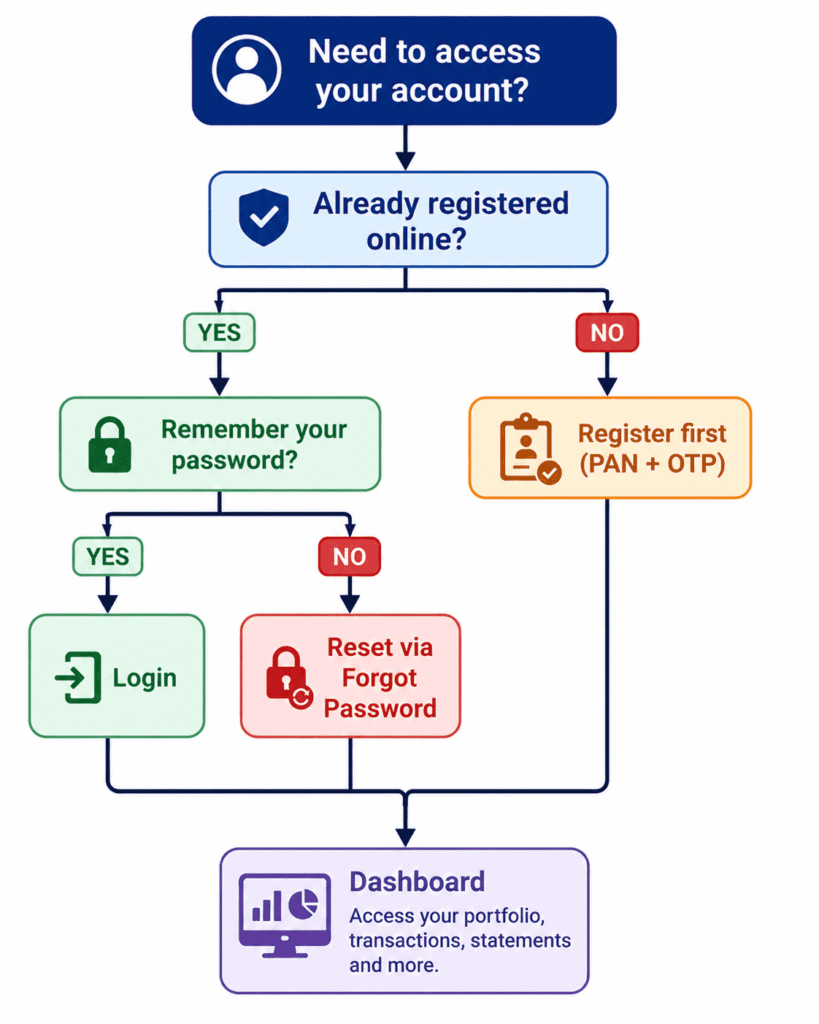
Login Decision Flow
How to Log In: Step by Step
Visit official website
↓
Select "Investor Login"
↓
Enter PAN / folio / email
↓
Verify with OTP or password
↓
Dashboard opens
- Go to the official Axis Mutual Fund website and click Investor Login in the top-right corner. Type the address directly rather than following a link from an SMS or email.
- Choose your login category - Investor, Distributor, or Corporate. Select Investor.
- Enter your credentials - Registered PAN, folio number, email ID, or mobile number, along with your password or OTP.
- Access your dashboard.
First-time user? Click First Time Login / Register instead.
First-Time Axis Mutual Fund Investor Login: Registration Flow
Open Registration
↓
Enter PAN
↓
Enter folio number
↓
Verify OTP
↓
Create password
↓
Login successfully
Who can register: Anyone holding an Axis Mutual Fund folio in their own name, with KYC completed through a KYC Registration Agency (KRA) or CKYC.
The process:
- Open the Investor Login page and select First Time Login / Register.
- Enter your PAN and folio number.
- Verify the OTP sent to your registered mobile.
- Create a password meeting the portal's strength requirements — typically upper and lowercase letters, numbers, and a symbol.
- Confirm and log in.
The critical detail: Your mobile number and email must match what's registered against the folio, not what you use day to day. If they've changed since you invested, update them through the AMC, CAMS, or KFintech before attempting registration.
Your Dashboard: What's There and Why It Matters
Most guides say "you'll reach your dashboard" and stop. Here's what each section is actually for:
| Section |
What it shows |
Why it matters |
| Portfolio summary |
Total invested, current value, gain/loss |
Tells you at a glance whether your investments are up or down |
| Holdings |
Each scheme, units, NAV, value |
Shows which specific funds are performing, not just the total |
| SIP tracker |
Active SIPs, amounts, next debit dates |
Catches missed instalments and upcoming debits before they bounce |
| Transaction history |
Purchases, redemptions, switches, dividends |
Your complete record for reconciliation and disputes |
| Capital gains |
Realised gains by financial year |
Essential when filing your income tax return |
| Statements |
Account statements, custom periods |
Needed for loan applications, audits, and personal records |
| Profile |
KYC status, bank mandate, nominee, contacts |
Where you fix the details that cause failed transactions |
The capital gains report is the one most investors overlook and then scramble for every March. Find it now rather than during filing season.
What You Can Do After Logging In
- Start a new SIP
- Pause or stop an existing SIP
- Invest a lump sum
- Redeem units (full or partial)
- Switch between schemes
- Download account statements
- Download capital gains reports
- Update bank account details
- Change or add a nominee
- Update email and mobile number
- Check KYC status
What You Cannot Do
Knowing the limits saves a wasted afternoon:
- View non-Axis mutual fund investments
- Use Axis Bank net banking credentials to log in
- Complete KYC entirely through the portal
- Skip OTP verification on sensitive transactions
- Log in before KYC is completed
- Access folios registered under a different PAN
That second point catches people out constantly — Axis Bank and Axis Mutual Fund are separate systems. Your net banking login won't work here.
The Axis Mutual Fund Mobile App
For routine checks, the app is faster than the website.
Available on: Android (Google Play) and iOS (App Store)
Login: PAN or folio with OTP on first setup, then typically fingerprint, Face ID, or a 4-digit PIN.
Best for: Portfolio checks, NAV tracking, quick SIP and redemption transactions, push notifications for debits and confirmations.
Where the website still wins: Detailed statement downloads, capital gains reports for tax filing, and bulk profile changes.
Forgot Password? Reset Flow
Forgot Password
↓
Enter PAN
↓
OTP verification
↓
Create password
↓
Login
- Click Forgot Password on the login page.
- Enter your registered PAN, folio number, or email ID.
- Verify the OTP sent to your registered mobile or email.
- Create a new password and log in.
Common Axis Mutual Fund Investor Login Errors & Solutions
| Error |
Likely cause |
Solution |
| Invalid PAN |
PAN not linked to this folio |
Check the PAN on your account statement |
| Wrong password |
Incorrect or outdated |
Use Forgot Password to reset |
| OTP not received |
Wrong number registered, or network delay |
Wait 60 seconds, resend, verify registered number |
| Account locked |
Multiple failed attempts |
Wait, then reset password or call support |
| Page won't load |
Browser cache |
Clear cache or switch browsers |
| Folio not showing |
Folio held with a different registrar |
Check whether it sits with CAMS or KFintech |
| Session expired |
Idle timeout |
Log in again — portals time out for security |
| KYC incomplete |
Registration blocked |
Complete KYC via KRA or CKYC first |
If Login Still Doesn't Work
Run this checklist before calling support — it resolves most cases:
- PAN linked correctly to the folio
- Mobile number updated and active
- Email address current
- KYC completed and verified
- Folio active, not dormant
- Browser cache cleared
- Stable internet connection
- Using Investor Login, not Distributor or Corporate
- Not using Axis Bank net banking credentials
If everything above checks out and you still can't get in, contact Axis Mutual Fund customer support with your PAN and folio number ready.
Common Axis Mutual Fund Investor Login Mistakes to Avoid
- Using a current email that isn't the registered one. The portal matches against the folio.
- Entering PAN in lowercase or with spaces. Type it exactly as printed.
- Assuming all folios appear together. Different registrars may mean separate access.
- Trying to log in before KYC is complete.
- Requesting a fresh OTP too quickly — wait the full 60 seconds.
- Using the Distributor login as an individual investor.
Where to Get Help
| Support option |
Best for |
| Customer care (phone) |
Login failures, locked accounts, urgent issues |
| Email support |
Account queries, documentation requests |
| Branch visit |
KYC updates requiring physical verification |
| CAMS |
Folio servicing for CAMS-registered schemes |
| KFintech |
Registrar support for KFintech-serviced folios |
| Distributor/advisor |
If you invested through an intermediary |
When to Contact Support
- Your account stays locked after a password reset
- OTPs never arrive despite a correct registered number
- Your folio doesn't appear on the dashboard
- A redemption or SIP failed but funds were debited
- Your KYC status shows a mismatch
- Bank mandate updates aren't reflecting
- You suspect unauthorised access
Have your PAN and folio number ready — it's the first thing you'll be asked for.
Security: Protecting Your Account
Axis Mutual Fund uses two-factor authentication, encrypted HTTPS connections, and OTP verification for redemptions, switches, and high-value transactions. Your habits matter just as much:
Never share: Your OTP with anyone (including callers claiming to be from Axis or your distributor), your password, or your PAN combined with folio details over unsolicited calls.
Always: Log out after each session, check for the padlock (HTTPS) before entering credentials, avoid public Wi-Fi for transactions, keep your registered mobile active for alerts, and type the website address yourself.
Alerts are your safety net. An out-of-date mobile number means you won't be notified of a redemption you didn't authorise.
Understanding the Ecosystem
Axis Asset Management Company manages the schemes. SEBI regulates them; AMFI is the industry body. Your KYC sits with a KYC Registration Agency (KRA) or under CKYC, verified against your PAN. Transactions are processed by registrars — CAMS or KFintech which is why folios sometimes appear on different platforms. Your folio number identifies your account, NAV determines unit value, and SIP is your recurring investment instruction.
If a problem traces back to KYC or folio records rather than the portal, the registrar is usually where it gets resolved. You can also compare the process with our
guide to ICICI Prudential Mutual Fund Login.
Practical Tips Most Investors Miss
- Download your capital gains report before March, not during the filing rush.
- Save statements each financial year rather than relying on portal access alone.
- Check nominee details annually, and after any major life event.
- Verify your bank mandate before redeeming — a stale account number is the top cause of failed redemptions.
- Keep your registered mobile active. It's your OTP route and your fraud alert.
- Note the reference number for every service request.
- Use an updated browser. Older versions occasionally break OTP fields.
Conclusion
For most investors, the Axis Mutual Fund Investor Login portal becomes the central place to manage SIPs, monitor portfolio performance, download tax reports, and update account information. Keeping your KYC and contact details current helps avoid the majority of login and transaction issues.
Two habits prevent nearly everything that goes wrong: keep your registered mobile number active, since it controls both OTP access and fraud alerts, and download your statements each financial year rather than assuming the portal will always be available when you need it.
Frequently Asked Questions
1. Can I log in using my mobile number?
Yes, if it's registered against your folio. You'll receive an OTP for verification.
2. Can I log in using my folio number?
Yes. Folio number is accepted alongside PAN, email, and mobile.
3. Can I log in without a PAN?
Generally no. PAN is central to mutual fund KYC in India and is the primary identifier.
4. What if my account is locked?
Wait a short while and retry, use Forgot Password, or contact support with your PAN and folio.
5. Why isn't my OTP arriving?
Usually the registered number differs from the one you expect, or there's a network delay. Wait 60 seconds, resend, and confirm which number is on the folio.
6. Can NRIs use the investor login portal?
NRI investors holding folios can generally access the portal, though certain transactions may carry additional requirements. Confirm your case with the AMC.
7. Can I download my capital gains report?
Yes, from the statements section, filtered by financial year.
8. How do I update my bank account?
Through the profile or service request section after logging in. Changes typically require verification and may not be instant.
9. Is the Axis Mutual Fund app safe?
It uses OTP verification and encrypted connections, with biometric or PIN login. Download only from the official Play Store or App Store listing.
10. Is Axis Bank Mutual Fund Login the same as Investor Login?
For your investor dashboard, yes — the terms are used interchangeably. But Axis Bank net banking credentials are a separate system and won't work here.
11. What if my account shows as inactive?
Often relates to incomplete KYC or a dormant folio. Contact support or your registrar to reactivate.
12. Is the login portal available 24/7?
Generally yes, though transactions submitted after cut-off times process on the next business day, and scheduled maintenance can cause brief downtime.
13. Can I register without completing KYC?
No. KYC completion through a KRA or CKYC is a prerequisite for both investing and portal access.
14. Why can't I see all my mutual fund investments here?
This portal shows Axis Mutual Fund folios only. Other AMCs appear on their own portals, or in a consolidated statement from CAMS or KFintech.
Sources:
Axis Mutual Fund official website
Axis Asset Management Company
SEBI
AMFI
CAMS
KFintech
Disclaimer
Portal features, menu labels, and login procedures may change over time. Always verify current processes on the official Axis Mutual Fund website before transacting. This article is for general information and is not investment advice. Mutual fund investments are subject to market risks; read all scheme-related documents carefully.