October 09, 2026 •
Rohit Negi •
insurance
Written by the Insure2Cover Content Team | Reviewed by Rohit Negi, Insurance Consultant, insure2cover.com | Last updated: October 2026
Quick Answer
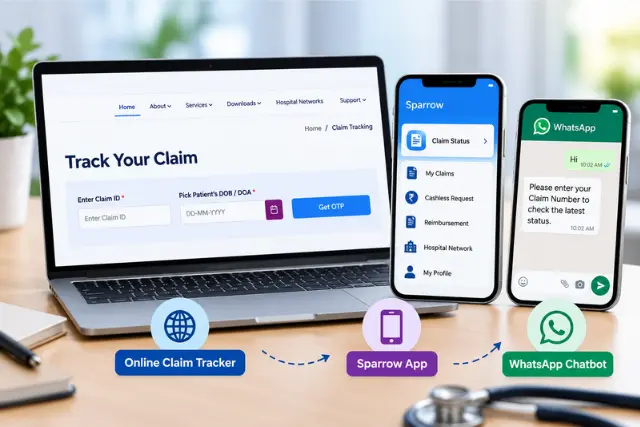
To check your FHPL claim status, visit
www.fhpl.net/#/claim_tracking, select your insurance company from the dropdown, enter your Claim Number or UHID along with the date of hospitalisation, and click Submit. No login is required.
You can also check via the FHPL Sparrow app (tap Claim Status on the home screen) or by sending "Hi" to 9154039276 on WhatsApp. For help, call 1800-425-033 (toll-free).
Which Method Should You Use?
Need to check your claim?
│
▼
Do you have your Claim Number?
│
YES─────────── NO
│ │
▼ ▼
Claim Tracker Do you have your UHID?
(fastest) │
YES ──────── NO
│ │
▼ ▼
Claim Tracker Open Sparrow App
(use UHID) or call 1800-425-033
The website tracker is the quickest route if you have either number to hand. If you have neither, the Sparrow app pulls your claim history automatically once you're logged in.
Three Ways to Track Your Claim
Method 1 - FHPL Claim Tracker (no login needed)
This is the part most guides skip: you don't need to log in at all to check a claim.
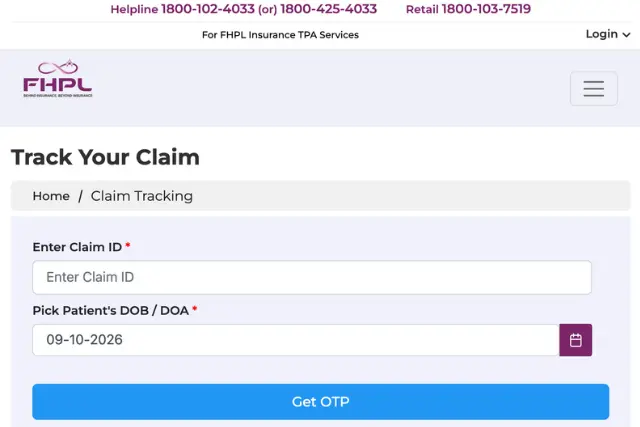
- Visit www.fhpl.net/#/claim_tracking
- Select your insurance company from the dropdown (HDFC ERGO, Star Health, New India, Tata AIG, and others)
- Enter your Claim Number or UHID
- Enter your date of hospitalisation
- Click Submit for real-time status
 Method 2 - FHPL Sparrow App
Log in to the Sparrow app → tap Claim Status on the home screen → view all active and past claims with current updates. Useful if you've misplaced your claim number, since your claim history is listed automatically. If you need help accessing your FHPL account before using Sparrow, see our
guide on FHPL login.
Method 3 - WhatsApp Chatbot
Send "Hi" to 9154039276, then type your claim number. The bot responds instantly with the latest status. No app, no login, works 24×7 — the easiest option if you're checking repeatedly.
What Your Claim Actually Goes Through
Understanding the journey makes the status wording far less confusing:
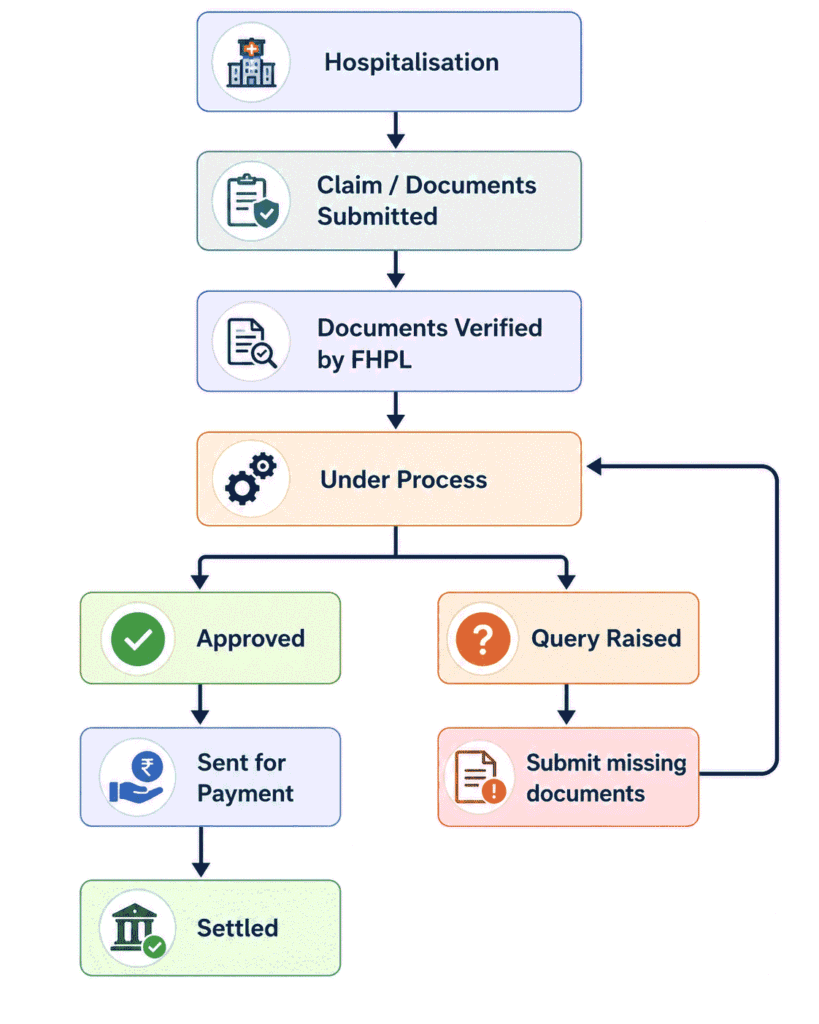
FHPL Claim Status Meanings, Decoded
| Status |
What it means |
| Documents Received |
FHPL has your paperwork and logged the claim |
| Under Process |
Being assessed against your policy terms |
| Query Raised |
Something is missing or unclear — action needed from you or the hospital |
| Approved |
Claim cleared; payment is being arranged |
| Sent for Payment |
Approved and released to the payment queue |
| Settled |
Money has been paid out; claim closed |
| Repudiated / Rejected |
Claim declined — the letter will state why |
"Under Process" is the one that worries people most. Don't panic. It simply means assessment is underway, not that anything is wrong. It's the longest stage by design, because it's where the actual verification happens.
"Sent for Payment" is good news — the decision is made and only the bank transfer remains.
How Long Does Each Status Take?
| Status |
Typical duration |
| Documents Received |
Same day to 1–2 days |
| Under Process |
Roughly 7–15 working days |
| Query Raised |
Depends entirely on how fast you respond |
| Approved |
Usually same day once assessment completes |
| Sent for Payment |
Around 3–7 working days |
| Settled |
Complete |
These are indicative ranges based on typical TPA processing, not guarantees. Actual timelines vary by insurer, claim complexity, and whether any clarification is needed. Cashless approvals during admission move much faster than reimbursement claims — often within hours rather than days.
If a status hasn't moved in significantly longer than the range above, that's your cue to follow up.
Why Is My FHPL Claim Delayed?
Most delays trace back to a handful of causes:
- Missing or illegible documents — the single most common reason
- Incorrect bank details submitted with a reimbursement claim
- Hospital clarification pending — FHPL has queried the hospital, not you
- Policy exclusions or waiting periods being verified against your cover
- Awaiting insurer approval on higher-value claims
- Investigation cases where additional verification is required
- Mismatch in medical records between the discharge summary and bills
- Recently issued policy requiring extra scrutiny
If your status shows Query Raised, that's not a delay — that's a request. Respond the same day if you can. Every day you wait adds directly to your settlement date.
Some rejections happen for reasons that were avoidable; our guide on common claim rejection reasons covers what to watch for before you file.
Documents You'll Need
| Cashless claim |
Reimbursement claim |
| Health eCard |
Original hospital bills |
| Photo ID (Aadhaar/PAN) |
Completed claim form |
| Hospital admission form |
Doctor's prescriptions |
| Doctor's notes / treatment plan |
Investigation & diagnostic reports |
| Pre-auth request (raised by hospital) |
Discharge summary |
| - |
Payment receipts |
| - |
Cancelled cheque / bank details |
Keep photocopies of everything you submit. If a query is raised weeks later, you'll want to know exactly what already went in.
Cashless vs Reimbursement: Why the Timelines Differ
|
Cashless |
Reimbursement |
| When it happens |
During hospitalisation |
After discharge |
| Who initiates |
Hospital TPA desk |
You |
| Portal used |
ePreAuth (hospital only) |
Claim submission to FHPL |
| Typical decision |
Hours |
Days to weeks |
| You pay upfront? |
No (up to approved limit) |
Yes, then claim back |
| Common delay cause |
Pre-auth queries |
Missing documents |
Our detailed comparison of reimbursement vs cashless claims explains which to choose when you have the option.
When Should You Contact FHPL?
Patience is warranted up to a point. Here's when to stop waiting:
| Situation |
Reasonable wait |
Contact FHPL |
| Under Process |
15 working days |
After 20 days |
| Sent for Payment |
7 working days |
After 7 days |
| Query Raised |
Act immediately |
Same day |
| Claim not appearing in tracker |
48 hours |
After 48 hours |
| Settled but no money received |
7 days |
After 7 days |
| Login or OTP trouble |
15 minutes |
Then call |
Contact details:
- Helpline: 1800-425-033 (toll-free, business hours)
- Email: info@fhpl.net
- WhatsApp: 9154039276 (24×7 chatbot)
Have your claim number ready before you call. It's the first thing you'll be asked for.
Troubleshooting: Tracker Not Working?
| Issue |
Likely reason |
Fix |
| Claim not found |
Wrong insurer selected |
Re-check the dropdown against your policy |
| Invalid UHID |
Typo or wrong number |
Verify against your health eCard |
| Date mismatch error |
Wrong hospitalisation date |
Use the admission date, not discharge |
| Status unchanged for days |
Still processing |
Normal up to ~15 working days |
| Payment not received after "Settled" |
Bank detail issue |
Contact FHPL with your claim number |
| Page won't load |
Browser cache |
Clear cache or try the Sparrow app |
| Claim missing entirely |
Not yet logged |
Wait 48 hours after submission, then call |
If Your Claim Is Rejected
A rejection isn't always final. You have escalation routes:
- Read the repudiation letter carefully — it must state the specific reason
- Gather counter-evidence if the reason appears factually wrong
- Raise a grievance with your insurer's grievance officer first
- Escalate to IRDAI through the IRDAI grievance process if unresolved
- Approach the Insurance Ombudsman as the final step — this is free and doesn't require a lawyer
Many rejections stem from waiting period rules or undisclosed pre-existing conditions rather than genuine disputes, so check those first.
Expert Tips
- Note your claim number the moment a claim is raised — every tracking method asks for it first.
- Photograph every document before submitting, including the discharge summary.
- Respond to queries the same day. This is the single biggest factor you control.
- Check the tracker weekly, not daily — status genuinely doesn't change that often.
- Verify your bank details on reimbursement claims before submission; wrong details are a common cause of "Settled but not received."
- Use the WhatsApp bot for routine checks rather than logging in each time.
- Keep your eCard downloaded so hospital admission never stalls on a login issue.
Conclusion
Checking your FHPL claim status is genuinely quick once you know you don't need a login. The tracker on FHPL's site handles most cases in under a minute with a claim number or UHID; the Sparrow app and WhatsApp bot cover the rest.
The bigger win is understanding what the status labels actually mean. "Under Process" isn't a problem. "Query Raised" is the one that needs you to move fast. And if nothing has changed in three weeks, that's when a phone call is worth making.
Sources:
- FHPL Official Website (fhpl.net)
- FHPL Sparrow App (Google Play, App Store)
- IRDAI · Health insurance claim servicing regulations
Frequently Asked Questions
1. How do I check my FHPL claim status online?
Visit www.fhpl.net/#/claim_tracking, select your insurer, enter your claim number or UHID plus the hospitalisation date, and submit. No login needed.
2. Can I check claim status without logging in?
Yes. The claim tracker and WhatsApp bot both work without credentials.
3. What does "Under Process" mean?
Your claim is being assessed against your policy terms. It's the normal working stage, typically lasting 7–15 working days.
4. What does "Sent for Payment" mean?
Your claim is approved and released for disbursement. Payment usually follows within about 3–7 working days.
5. How do I check a cashless claim status?
The same tracker works for both cashless and reimbursement claims. During admission, the hospital's TPA desk can also check the pre-auth status directly.
6. How do I check reimbursement claim status?
Use your claim number in the tracker. Reimbursement claims take longer than cashless because assessment happens after discharge.
7. Where do I find my claim number?
It's on your claim acknowledgement SMS or email. Your hospital's TPA desk or the FHPL helpline can also retrieve it.
8. What is a UHID and where do I find it?
Your Unique Health Identification number appears on your FHPL health eCard, and works as an alternative to the claim number.
9. My insurer is Tata AIG — can I still use the FHPL tracker?
Yes, if FHPL is the TPA administering your policy. Select your insurer from the dropdown before searching.
10. Why can't I find my claim in the tracker?
Usually the wrong insurer selected, a typo, or the claim hasn't been logged yet. Wait 48 hours after submission, then call.
11. How long does an FHPL claim take to settle?
Typically a few weeks end to end for reimbursement, though it varies by insurer and complexity. Cashless approvals during admission are far quicker.
12. My claim shows Settled but I haven't received the money.
Allow up to 7 days for the bank transfer. Beyond that, contact FHPL with your claim number — incorrect bank details are the usual culprit.
13. What if my claim is rejected?
Read the repudiation letter, raise a grievance with your insurer, then escalate to IRDAI or the Insurance Ombudsman if unresolved.
14. Can I track a claim through the Sparrow app?
Yes. Log in, tap Claim Status, and your active and past claims are listed with current updates.
Disclaimer
Claim timelines are indicative and vary by insurer, policy terms, and claim complexity. Portal features and URLs are based on publicly available information as of July 2026. For current details, refer to www.fhpl.net or contact FHPL customer care. E-Insure First is not affiliated with Family Health Plan Insurance TPA Limited. This article is for general information and is not insurance advice.